Rendered by Finder
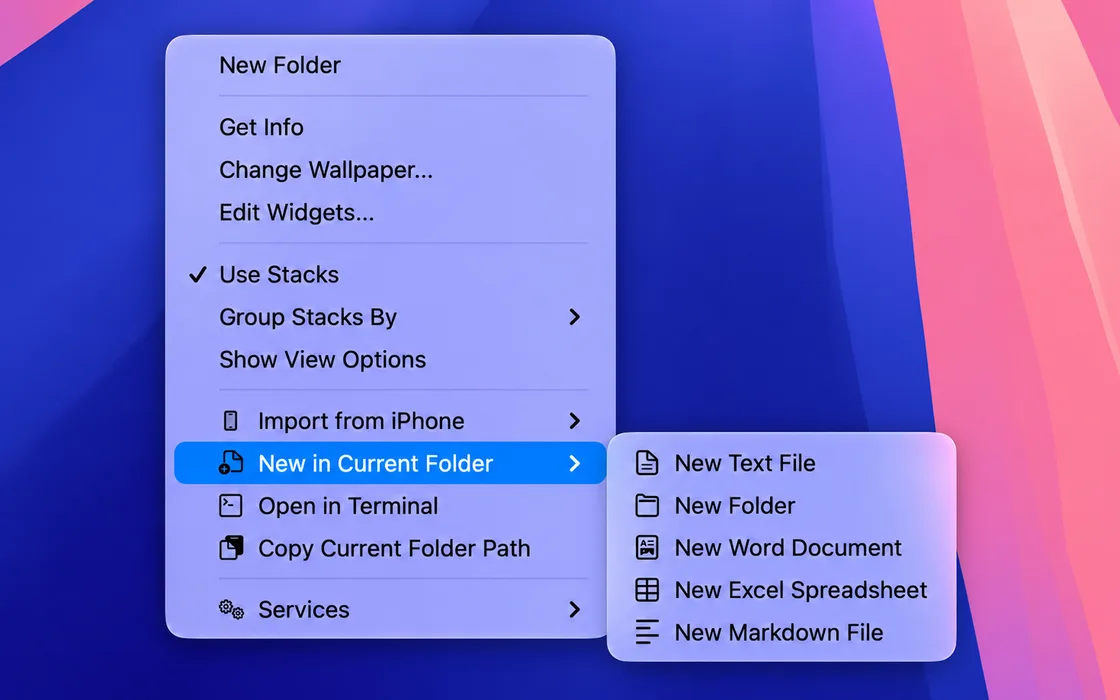
Context Menu Companion uses the Finder Sync Extension API. The menu is drawn by Finder itself — matching your system theme, Dark Mode, and Liquid Glass on macOS 26.
Finder Extension for macOS
A native right-click shortcut for creating files in Finder. Fast, quiet, and exactly where you need it.
One gesture, zero detours
Right-click any folder in Finder, choose a template, and keep moving. Context Menu Companion adds a native New submenu through Apple's own Finder Sync API — so the shortcut feels like it was always there.
Why Context Menu Companion
Context Menu Companion uses the Finder Sync Extension API. The menu is drawn by Finder itself — matching your system theme, Dark Mode, and Liquid Glass on macOS 26.
English, 简体中文, 繁體中文, 日本語, 한국어, Italiano, and ไทย from day one. The menu speaks the language your system speaks.
No account. No cloud sync. No telemetry. Context Menu Companion runs entirely on your machine and never phones home.
When macOS restricts access to a folder, Context Menu Companion tells you what happened and walks you through granting permission.
Plain text, Markdown, Word (.docx), Excel (.xlsx), and folders. Each template is minimal, valid, and ready to rename.
Open Terminal here. Copy path to clipboard. Small utilities that belong in the right-click menu.
Get started
Download and open the app. It stays lightweight and local.
Follow the in-app guide to enable the Finder extension in System Settings.
The "New File" submenu appears. Create from where you already are.
Free. Native. No account required.
View on Mac App Store